Never miss a Google Tag Manager update: release notes to Slack with Apps Script
Google Tag Manager changes more often than most people notice, and some of those changes touch live tracking. Here is the small, free setup that posts every new GTM release note to a Slack channel, in full and formatted, a few hours after Google publishes it.
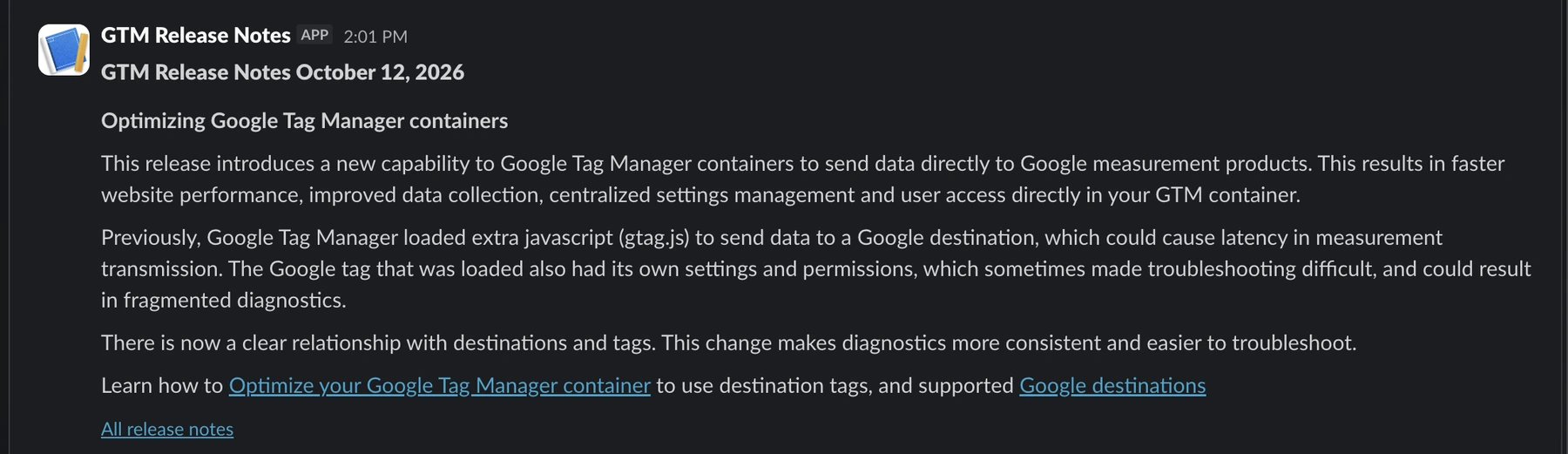
Why GTM release notes deserve attention
For a long time, I heard about GTM updates the same way most analysts do: a LinkedIn post a few days later, if at all. That works for UI tweaks. It does not work for changes that alter how a container behaves in production.
Two recent examples from the official release notes show why:
- In October 2026, Google changed how
gtag('config')commands behave next to GTM containers. Config commands now surface in the data layer asgtag.configevents, which means tags on wildcard custom event triggers can start firing on them. If you only learn about that weeks later, you are cleaning up inflated numbers. - A few days later, GTM containers gained the ability to send data directly to Google destinations without loading an extra
gtag.js. That is good news for performance, but it also changes how diagnostics and settings relate to your tags.
Neither is dramatic on its own. But in a setup with many containers, “someone will notice eventually” is not a process. I wanted every new entry in front of the team, with a link, on the day it appears.
The approach: a scheduled Apps Script and a Slack webhook
The whole thing is a single Google Apps Script file of about 150 lines. No server, no hosting, no cost. It works in four steps:
- A time-driven trigger runs the script every six hours.
- The script fetches the official release notes page and splits it into entries. Every date heading starts a new release, and its content runs until the next date heading.
- It compares the newest date with the last date it has seen, which it keeps in Script Properties.
- Every newer entry is converted from HTML to Slack formatting and posted through an Incoming Webhook, oldest first.
Apps Script is a good fit because it already has everything this job needs: an HTTP client (UrlFetchApp), a small key-value store (PropertiesService) and a scheduler (time-driven triggers). All of it runs on Google’s infrastructure with your Google account.
The Slack side
On the Slack side you need an app with the Incoming Webhooks feature turned on, connected to the channel you want to post to. Slack then gives you a webhook URL. Anything that sends JSON to that URL appears as a message in the channel.
Plan for approval in company workspaces. Many organizations require an admin to approve new Slack apps, even simple webhook apps. Request it early and explain what the app does and that it only posts, it never reads messages.
Treat the webhook URL like a password. Anyone who has it can post to your channel. Keep it out of the code and store it in Script Properties instead.
How the script is built
The script is a single Apps Script file split into a few small parts, each with one job:
- A main function that the trigger calls. It fetches the release notes, compares them with the last date it has seen and posts anything newer.
- A parser that reads the help page and splits it into one entry per release date.
- A converter that turns each entry from HTML into Slack’s own formatting, links included.
- A Slack sender that builds the message with Slack’s Block Kit and posts it to the webhook.
- Two helpers for setup: one posts the latest note right away, so the formatting can be checked before going live, and one creates the six-hour trigger and stores the starting point.
Setting it up takes about ten minutes: create an Apps Script project, add the webhook URL as a Script Property, run the test once to check the message in Slack, and then create the trigger. After that there is nothing to maintain.

checkReleaseNotes, and nothing else to maintain.Things I learned along the way
Parsing a help page is fragile, so fail loudly
There is no official feed for these release notes, so the script reads the HTML of the help page. If Google redesigns that page, the parser may find nothing. The worst outcome would be a script that silently stops working. That is why the script throws an error when the request fails or no entries can be parsed. A failing trigger shows up in the Executions log, and Apps Script can email the owner about failed runs, so a broken parser does not go unnoticed.
Release notes are not Slack-ready
The help page is HTML, and Slack uses its own markup. The script converts headings, bold text, code, lists and links. Links need special care: they are swapped for placeholders before the remaining tags are stripped, then restored in Slack’s <url|text> format. Relative links on the help page are turned into absolute ones, so they still work in Slack.
Respect Slack’s limits
A single text section in a Slack Block Kit message can hold up to 3,000 characters, and some release notes are longer than that. The script splits long notes into several sections, so nothing gets cut off or rejected.
Seed the state before the first run
Without a starting point, the first run would have nothing to compare against. The setup step stores the current latest date right away, so only notes published after setup are posted, and the channel is not flooded with years of history.
Know the trade-off of tracking dates
The script remembers the date of the newest release, not every individual note. That keeps it simple and covers how Google publishes almost every time. The one case it would miss is Google adding a new note under a date that already exists on the page. For release notes that appear a few times a month, I am happy with that trade-off.
What changed for us
The biggest effect is not speed, it is the conversation. A new entry now arrives as a Slack message with its own thread, and the question “does this affect our setup?” gets answered there, on the same day, by the people who know the containers. For changes like the gtag.config event, that is the difference between a quick check of wildcard triggers and a surprise in next month’s report.